 button in the Program Touch Screens
section of Design & Program
or via the View/Edit
Available Sources hyperlink in the Available
Source property in the Properties Grid for the Media Zone:
button in the Program Touch Screens
section of Design & Program
or via the View/Edit
Available Sources hyperlink in the Available
Source property in the Properties Grid for the Media Zone: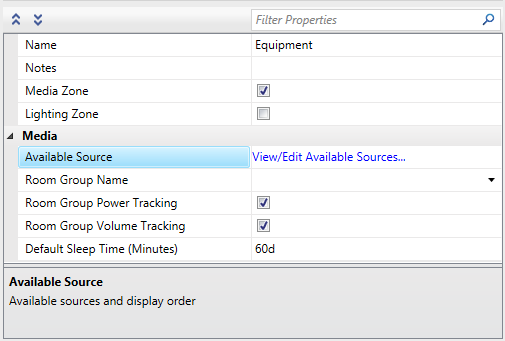
The Touch Screen Source Choices Dialog lets you eliminate sources from the control of a touch screen, and allows you to specify the order in which the selected sources will be shown on the screen. It is available for each touch screen in the project that supports flash, and the content it is setting affects only that touch screen. That is, setting up the content for touch screen A does not affect touch screen B even if they are in the same room.
The Touch Screen Source Choices
Dialog is accessible via the
button in the Program Touch Screens
section of Design & Program
or via the View/Edit
Available Sources hyperlink in the Available
Source property in the Properties Grid for the Media Zone:
When the Touch Screen Source Choices Dialog opens for the first time, the Selected Sources pane on the right lists all routable media source devices (devices connected in the Source Routes Diagram), and the Available Sources pane on the left is empty.
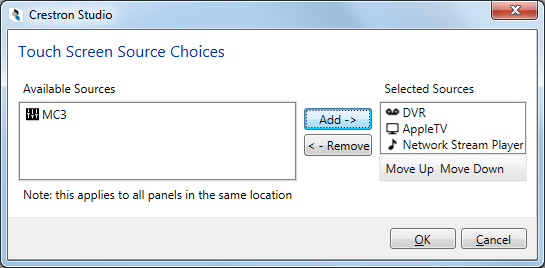
Use the  button to remove the
selected source (multi-selection is not supported) from the Selected
Sources list, or the
button to remove the
selected source (multi-selection is not supported) from the Selected
Sources list, or the  button to add them back in. Source devices placed in the Available
Sources pane will NOT be visible at run time.
button to add them back in. Source devices placed in the Available
Sources pane will NOT be visible at run time.
Select a device and then use the  /
/ buttons to adjust the order of the selected source devices.